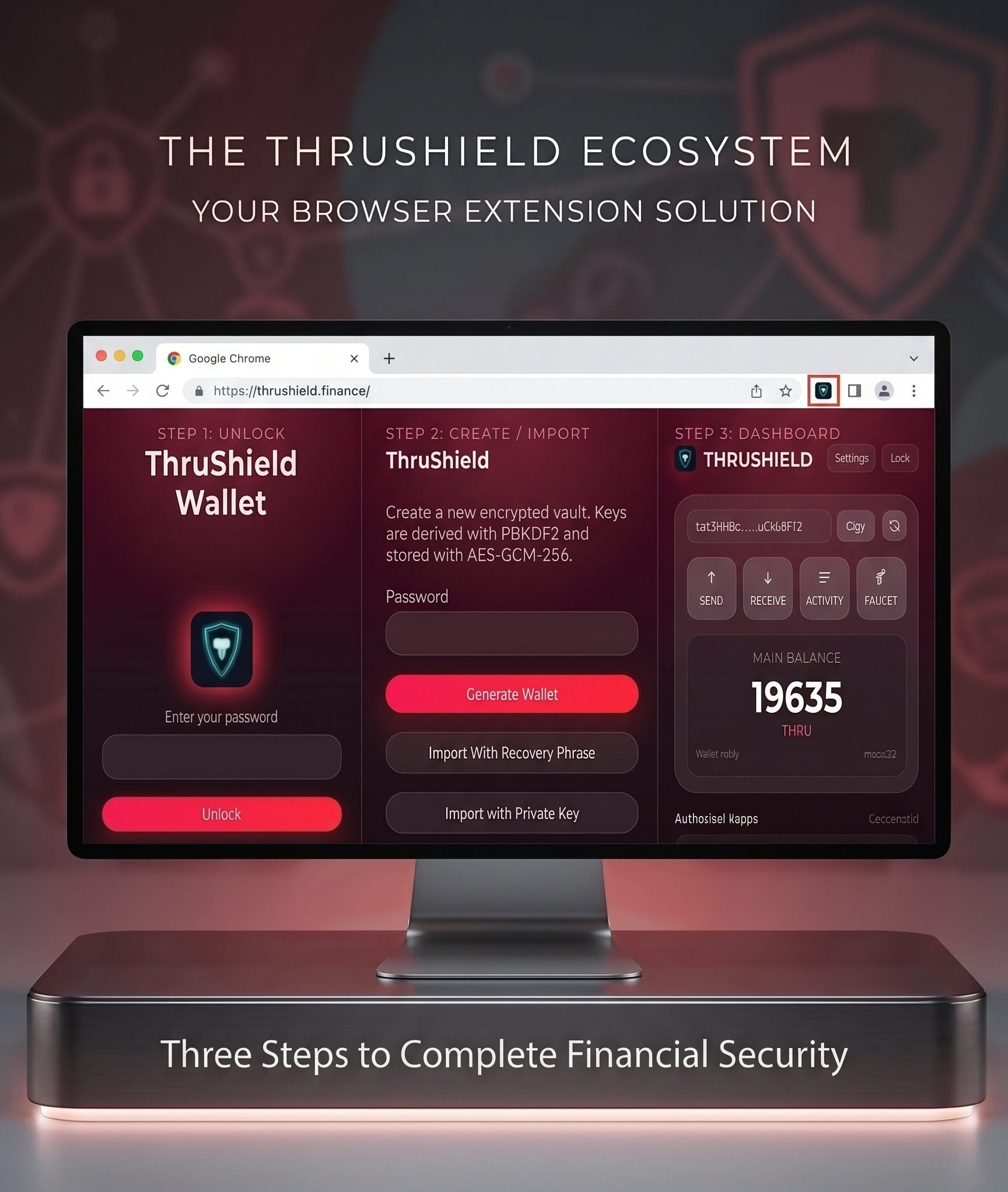
Key Features
Non Custodial
Private keys are stored only on your device. There is no central server holding your information.
Open Source
The complete code is public. Anyone can review the code and verify how funds are managed.
Strong Encryption
AES-GCM-256 and PBKDF2-SHA256 with 310,000 iterations for high security.
Auto-Lock
Private keys are automatically wiped from memory after 15 minutes of inactivity.
Transaction Confirmation
No blind signing. All transactions are previewed and confirmed before signing.
Origin Allowlist
connect() and signTransaction() only work through authorized addresses.
HD Wallet
One mnemonic to manage multiple accounts. Each account has a different private key.
Alphanet Support
For testing: Faucet, RPC, and transactions on the Thru test network.
Security Model
- Local generation: Mnemonic is generated locally only
- Private key: held only temporarily in RAM
- Encryption: AES-GCM-256 for persistent storage
- Key derivation: PBKDF2 with 310,000 iterations
- Wiping: secureZero() for definitive memory removal
- Auto-Lock: 15 min inactive = Auto Lock
- Origin whitelisting: only allowed origins can connect
- Transaction confirmation: no blind signing - all transactions previewed
- Limited permissions: storage, activeTab, host access for *.thru.org
Technology & Tools
FrontendReact + TypeScript + Vite
StylingPostCSS + Tailwind
Crypto@thru/thru-sdk + Native Web Crypto
Storagechrome.storage.local + AES-GCM-256
BuildVite + npm
NetworkRPC over HTTPS
LanguageTypeScript (97.7%)
PlatformChrome Extension Manifest V3
Versions & History
v0.1.1 (Latest)17 Jul 2026 - UI Redesigned
v0.1.0 (Initial)14 Jul 2026 - Initial beta
Alphanet OnlyFor testing only, no real funds involved
LicenseMIT License
DApp Integration
window.thru ObjectPlaces the Dapp API in allowed pages
connectVerifies origin, returns the account address
getSigningContextTo get the public key and context
signTransaction(txData)Signs the transaction (mandatory confirmation)
Planning Notes
Testnet Only
Still Alphanet - the API may change. No real funds involved.
Chrome Desktop
Chrome Extension only. Mobile or other browsers are not supported.
Active Development
Experimental versions. Possible errors exist. No warranty.
Single Mnemonic Limit
One mnemonic per extension. Multi-wallet support would be better.
Frequently Asked Questions
What is ThruShield Wallet?
ThruShield is a non-custodial Chrome Extension wallet specifically built for the Thru Blockchain. It allows you to securely manage your accounts, tokens, and interact with decentralized applications (dApps).
Is it safe to use?
Yes, it uses industry-standard AES-GCM-256 encryption to store your wallet data locally on your device. Your private keys are never transmitted to any external server, and memory is actively wiped when the wallet locks.
Which network does it support?
Currently, ThruShield operates exclusively on the Thru Alphanet. This is a test network, meaning the tokens have no real-world value and are used purely for development and testing.
I forgot my password. Can you recover my wallet?
No. Because ThruShield is non-custodial, we do not have access to your password or your recovery phrase. If you lose your password, your only option is to restore your wallet using your secret 12-word mnemonic phrase.
Can I use this on my mobile phone?
At this time, ThruShield Wallet is only available as a Chrome Extension for desktop browsers. Mobile support is not currently provided.
Overall System Architecture
graph TB
subgraph "Chrome Extension"
A["Background Service Worker"]
B["UI Components"]
C["Local Storage"]
end
subgraph "Encryption & Security"
D["PBKDF2-SHA256"]
E["AES-GCM-256"]
F["Key Management"]
end
subgraph "Blockchain Interaction"
G["@thru/thru-sdk"]
H["RPC Client"]
I["Transaction Encoder"]
end
subgraph "External Services"
J["Alphanet RPC"]
K["Faucet Service"]
L["Web3 Dapps"]
end
B -->|Request| A
A -->|Encrypt/Decrypt| E
E -->|Derive Key| D
D -->|Store| C
A -->|Sign| F
F -->|Build Tx| I
I -->|SDK| G
G -->|HTTP| H
H -->|Connect| J
A -->|Authorized Origin| L
A -->|Get Tokens| K
style A fill:#667eea,stroke:#333,color:#fff
style D fill:#764ba2,stroke:#333,color:#fff
style E fill:#764ba2,stroke:#333,color:#fff
style F fill:#764ba2,stroke:#333,color:#fff
style J fill:#28a745,stroke:#333,color:#fff
style K fill:#28a745,stroke:#333,color:#fff
Wallet Activity Flow
graph LR
A["Start"] -->|Create/Import| B["Generate Mnemonic"]
B -->|Encrypt| C["Vault Storage"]
C -->|Unlock| D["Wallet Open"]
D -->|Private Key Load| E["Unlocked Memory"]
D -->|Select| F["Token Transfer"]
D -->|Select| G["Faucet Request"]
D -->|Select| H["Account Management"]
F -->|Sign Tx| I["Confirm Transaction"]
G -->|Create Account| J["Account Activation"]
H -->|Switch| K["HD Wallet Account"]
I -->|Send| L["Broadcast to RPC"]
J -->|Withdraw| L
K -->|Ready| D
D -->|15 min timeout| M["Auto Lock"]
M -->|Wipe Keys| N["Memory Wiped"]
L -->|Done| O["Transaction Confirmed"]
style A fill:#667eea,stroke:#333,color:#fff
style O fill:#28a745,stroke:#333,color:#fff
style M fill:#dc3545,stroke:#333,color:#fff
Encryption & Security Architecture
graph TB
A["User Password"] -->|310,000 iterations| B["PBKDF2-SHA256"]
B -->|Derive| C["Encryption Key"]
D["Mnemonic/Private Key"] -->|plaintext in memory| E["AES-GCM-256"]
C -->|Encrypt| E
E -->|Ciphertext| F["chrome.storage.local"]
G["secureZero()"] -->|Wipe| E
G -->|Memory Clear| H["RAM cleared on lock"]
I["Origin Allowlist"] -->|Authorize| J["connect() origin"]
I -->|Authorize| K["signTransaction() origin"]
L["@thru/thru-sdk"] -->|Decode| M["Transaction Preview"]
M -->|No blind signing| N["User Confirmation"]
style B fill:#764ba2,stroke:#333,color:#fff
style E fill:#764ba2,stroke:#333,color:#fff
style F fill:#764ba2,stroke:#333,color:#fff
style N fill:#667eea,stroke:#333,color:#fff
File Structure & Components
graph TB
ROOT["ThruShield Root"]
ROOT -->|TypeScript| SRC["src/"]
ROOT -->|Icons| ICONS["icons/"]
ROOT -->|Config| MANIFEST["manifest.json"]
ROOT -->|Config| VITE["vite.config.ts"]
ROOT -->|Config| TS["tsconfig.json"]
SRC -->|React| COMPONENTS["Components"]
SRC -->|Logic| UTILS["Utils & Helpers"]
SRC -->|Storage| STORAGE["Storage Manager"]
COMPONENTS -->|UI| UNLOCK["UnlockPage"]
COMPONENTS -->|UI| TRANSFER["TransferPage"]
COMPONENTS -->|UI| FAUCET["FaucetPage"]
COMPONENTS -->|UI| ACCOUNTS["AccountManager"]
COMPONENTS -->|UI| EXPORT["PrivateKeyExport"]
UTILS -->|Crypto| CRYPTO["Encryption/Decryption"]
UTILS -->|Wallet| MNEMONIC["Mnemonic Generation"]
UTILS -->|RPC| RPC["RPC Client"]
UTILS -->|TX| BUILDER["Transaction Builder"]
STORAGE -->|AES-GCM| VAULT["Encrypted Vault"]
STORAGE -->|Memory| KEYS["Key Management"]
style ROOT fill:#667eea,stroke:#333,color:#fff
style SRC fill:#764ba2,stroke:#333,color:#fff
style COMPONENTS fill:#e8f4f8,stroke:#667eea,stroke-width:2px
style UTILS fill:#e8f4f8,stroke:#667eea,stroke-width:2px
style STORAGE fill:#e8f4f8,stroke:#667eea,stroke-width:2px
Runtime Flow: Sign a Transaction
sequenceDiagram
participant Dapp as Web App
participant Ext as ThruShield Ext
participant Storage as Chrome Storage
participant Crypto as Crypto Engine
participant RPC as Thru RPC
Dapp->>Ext: signTransaction(txData)
Ext->>Ext: Check Origin Allowlist
Ext->>Crypto: Decrypt Private Key
Storage->>Crypto: AES-GCM Unlock
Crypto->>Ext: plaintext Key
Ext->>Ext: Preview Transaction (SDK)
Ext->>Ext: User Confirms?
Ext->>Crypto: Sign Transaction
Crypto->>Crypto: Sign with Private Key
Ext->>Crypto: secureZero() - Wipe Key
Ext->>RPC: Broadcast Signed Tx
RPC->>RPC: Execute on Chain
RPC-->>Dapp: Tx Hash + Receipt
Dapp-->>Dapp: Update UI